Morphology and Contours
Operations defined by shape rather than by value. The standard toolkit for cleaning up masks and measuring the objects inside them.
Morphology treats an image as a set of foreground pixels and probes it with a small shape called a structuring element. The two primitive operations ask simple questions. Does the shape fit here, and does it touch here.
Binary Morphology
| Operation | Rule | Effect on the mask |
|---|---|---|
| Erosion | Keep a pixel only if the element fits entirely | Shrinks objects, removes thin protrusions and specks. |
| Dilation | Keep a pixel if the element touches any foreground | Grows objects, closes small gaps and pinholes. |
| Opening | Erode, then dilate | Removes small objects, keeps the size of the large ones. |
| Closing | Dilate, then erode | Fills small holes, keeps the size of the large ones. |
Structuring elements
The element defines the neighbourhood and therefore the character of the result. A cross preserves horizontal and vertical structure. A disc is isotropic. A long horizontal line erases everything except horizontal runs, which is how table rules are extracted from a scanned form.
A four-connected cross. The value 1 marks a position included in the element.
Opening and closing
Opening and closing are idempotent. Applying either one twice changes nothing the second time, which makes them safe to use as normalisation steps. Erosion and dilation are not idempotent, and repeating them keeps eating or growing the mask.
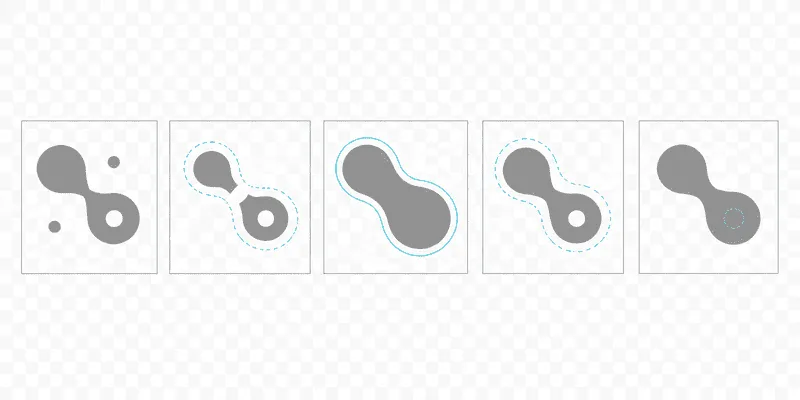
Image prompt
Five minimal panels in a row on a transparent background, each showing the same abstract binary blob shape: a rounded form with one thin neck, two small isolated dots nearby, and one small interior hole. Panel one is the original in solid mid-grey. Panel two shows it eroded, visibly thinner with the neck broken and the dots gone. Panel three shows it dilated, thicker with the hole filled. Panel four shows opening, dots removed but outline preserved. Panel five shows closing, hole filled but outline preserved. The differences from the original are outlined in cyan. Flat vector, no text, no gradients, 16:5.
Feature Extraction and Analysis
Skeletons and distance transforms
The distance transform replaces each foreground pixel with its distance to the nearest background pixel. Ridges in that field trace the medial axis of the shape. Thinning algorithms find the same structure by peeling boundary pixels while preserving connectivity, which is a stricter condition than it sounds.
Skeletons are used for measuring path length, for classifying handwriting strokes, and as the seed stage of the watershed described below.
Contours and hierarchy
Contour extraction walks the boundary of each connected region and returns an ordered list of points. Because a region can contain holes and a hole can contain another region, the output is a tree rather than a list.
| Measurement | Computed from | Watch out for |
|---|---|---|
| Area | The shoelace formula over the contour | Sign indicates winding direction. |
| Perimeter | Summed segment lengths | Diagonal steps count as √2, not 1. |
| Circularity | 4π · area / perimeter² | Sensitive to boundary noise. |
| Bounding box | Coordinate extrema | Axis aligned unless a rotated box is requested. |
Watershed segmentation
Watershed treats intensity as elevation and floods the surface from a set of seeds. Where two floods meet, a boundary is drawn. It is the standard answer to separating objects that touch, which no threshold can do on its own.
- 01
Produce a clean binary mask
Threshold, then open to remove speckle. Everything downstream inherits the errors left here.
- 02
Find certain foreground and certain background
Threshold the distance transform for foreground seeds. Dilate the mask generously for background. The gap between them is the unknown region.
- 03
Label the seeds
Each connected foreground component gets a distinct integer. Unknown pixels are marked as zero.
- 04
Flood
Run the watershed on the gradient magnitude with those labels. Ridge lines fall where the touching objects meet.
Module 07 leaves analysis behind and asks how the array becomes a file.